 7a93625781
|
||
|---|---|---|
| Not_working_with_v2 | ||
| csdr@69bfc62890 | ||
| doc | ||
| src | ||
| .gitignore | ||
| 84308.mp3 | ||
| BBC.jpg | ||
| LICENCE | ||
| README.md | ||
| audio | ||
| easytest.sh | ||
| fifohost.py | ||
| fm2ssb.sh | ||
| foxhunt | ||
| ft8menu.sh | ||
| install.sh | ||
| picture.U | ||
| picture.V | ||
| picture.Y | ||
| picture.rgb | ||
| rtlmenu.sh | ||
| sampleaudio.wav | ||
| silent_1-second.wav | ||
| snap2spectrum.sh | ||
| snapsstv.sh | ||
| song.wav | ||
| stereo_44100.wav | ||
| sv1afnfilter.sh | ||
| testam.sh | ||
| testchirp.sh | ||
| testfmrds.sh | ||
| testfoxhunt.sh | ||
| testfreedv.sh | ||
| testfsq.sh | ||
| testnfm.sh | ||
| testopera.sh | ||
| testpocsag.sh | ||
| testrtty.sh | ||
| testspectrum.sh | ||
| testssb.sh | ||
| testsstv.sh | ||
| testvfo.sh | ||
| transponder.sh | ||

README.md
About rpitx2
rpitx2 is a general radio frequency transmitter for Raspberry Pi which doesn't require any other hardware unless filter to avoid intererence. It can handle frequencies from 5 KHz up to 1500 MHz.
Rpitx2 is a software made for educational on RF system. It has not been tested for compliance with regulations governing transmission of radio signals. You are responsible for using your Raspberry Pi legally.
RPITX2 IS BASED ON RPITX
A forum is available : https://groups.io/g/rpitx
_Created by Evariste Courjaud F5OEO. See Licence for using it.
Installation
Assuming a Raspbian Lite installation (stretch) : https://www.raspberrypi.org/downloads/raspbian/
Be sure to have git package installed :
sudo apt-get update
sudo apt-get install git
You can now clone the repository. A script (install.sh) is there for easy installation. You could inspect it and make steps manualy in case of any doubt. You can note that /boot/config.txt should be prompt to be modified during the installation. If it is not accepted, rpitx2 will be unstable.
git clone https://github.com/KubaPro010/rpitx2
cd rpitx2
./install.sh
Make a reboot in order to use rpitx2 in a stable state. That's it !
sudo reboot
Hardware

note: you don't need it, i've been transmitting since summer 2023 without it, and no one knocked at my door, but your country laws can be stricter
| Raspberry Model | Status |
|---|---|
| Pizero | OK |
| PizeroW | OK |
| PiA+ | OK |
| PiB | Partial |
| PiB+ | OK |
| P2B | OK |
| Pi3B | OK |
| Pi3B+ | OK |
| Pi3A+ | OK |
| Pi4 | Partial (system may crash completly) |
Plug a wire on GPIO 4, means Pin 7 of the GPIO header (header P1). This acts as the antenna. The optimal length of the wire depends the frequency you want to transmit on, but it works with a few centimeters for local testing. (Use https://www.southwestantennas.com/calculator/antenna-wavelength to calculate the lenght, make sure to use the 1/4 wave setting, as for 1/2 wave you'd need a impedance transformator, and these are not cheap [also yes, i learned it the hard way after having to cut my antenna])
How to use it

Easytest
easytest is the easiest way to start and see some demonstration. All transmission are made on free ISM band (434MHZ). To launch it, go to rpitx folder and launch easytest.sh :
cd rpitx
./easytest.sh
Choose your choice with arrows and enter to start it.Don't forget, some test are made in loop, you have to press CTRL^C to exit and back to menu.
Easy way to monitor what you are doing is by using a SDR software and a SDR receiver like a rtl-sdr one and set the frequency to 434MHZ.
Carrier
 A simple carrier generated at 434MHZ.
Chirp
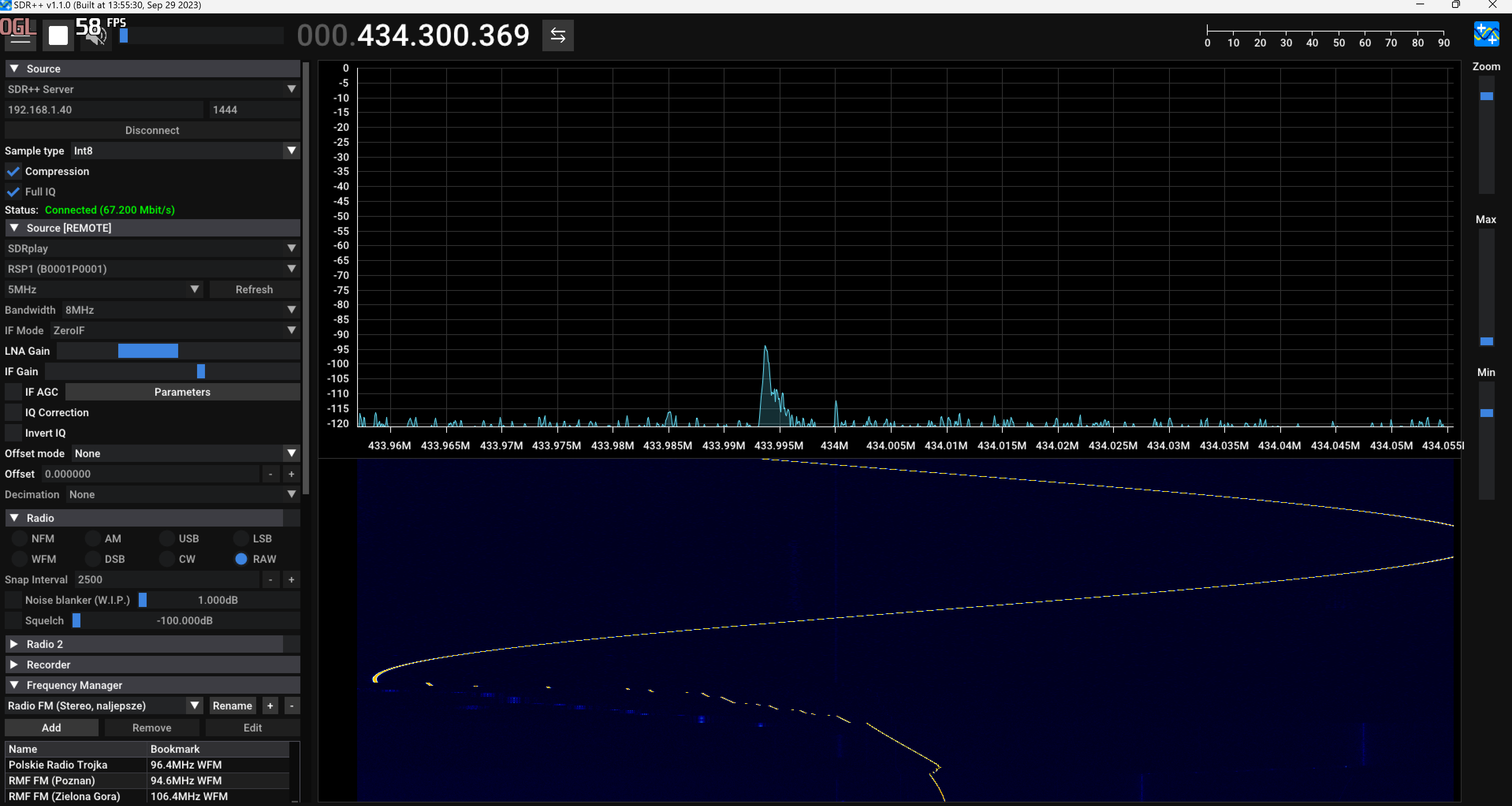 A carrier which move around 434MHZ.
Spectrum
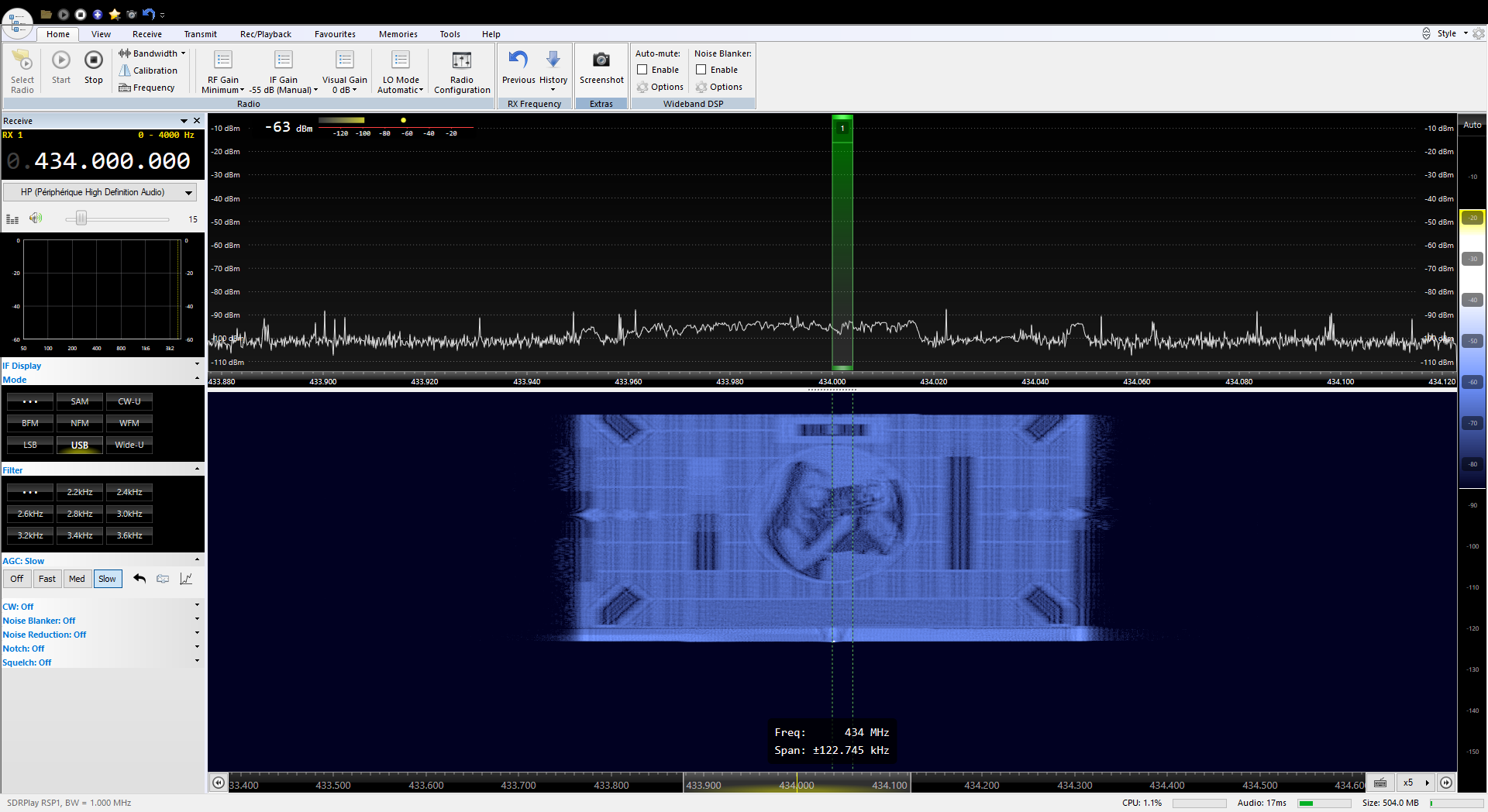 A picture is displayed on the waterfall on your SDR. Note that you should make some tweaks in order to obtain contrast and correct size depending on your reception and SDR software you use.
RfMyFace
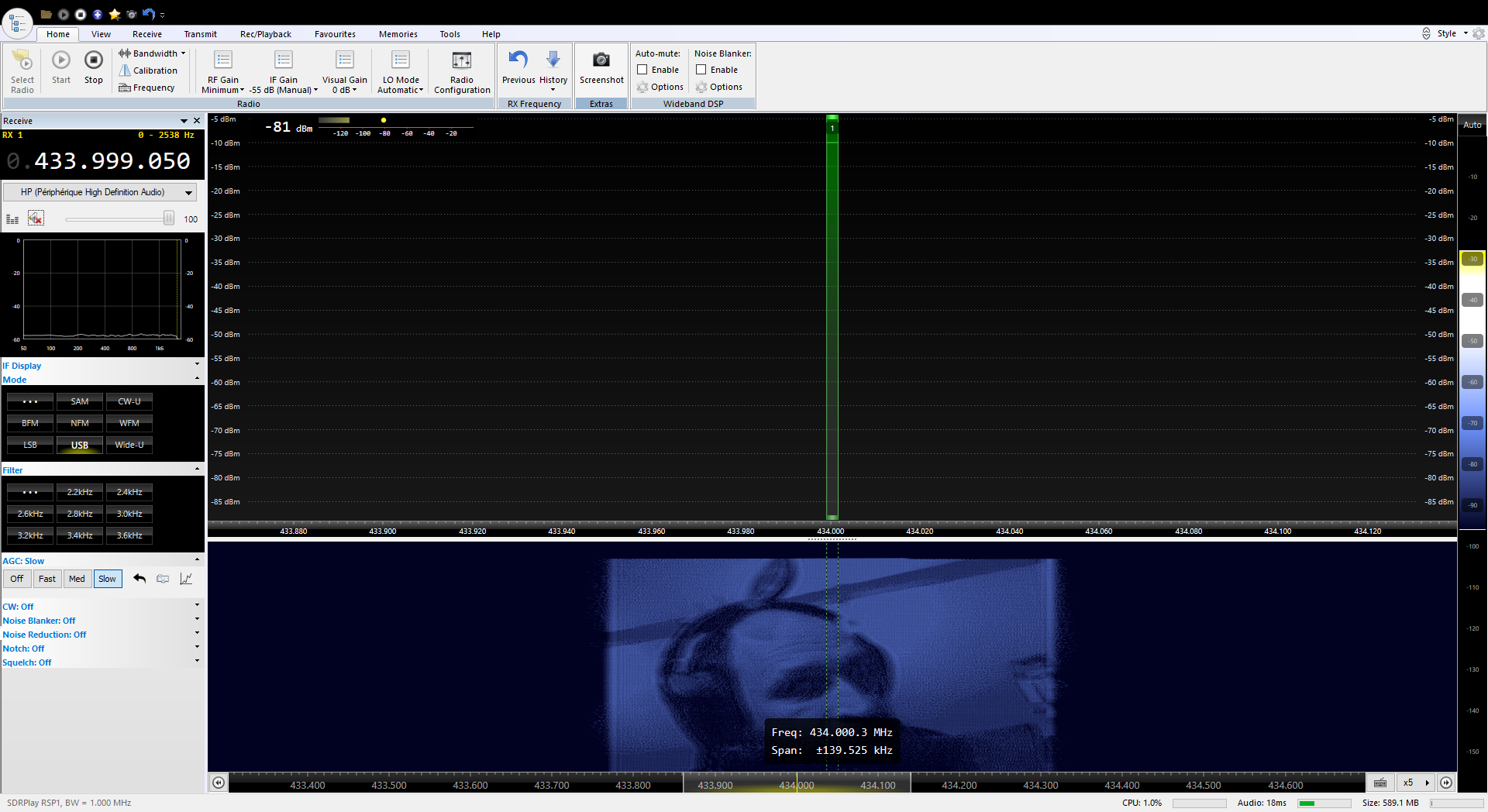 Spectrum painting of your face using the raspicam for fun !
FM with RDS
 Broadcast FM with RDS. You should receive it with your SDR. This is the modulation that you should hear on your classical FM Radio receiver, but at this time, the frequency is too high.
Single Side Band modulation (SSB)
 This is the classical Hamradio analog voice modulation. Use your SDR in USB mode.
Slow Scan Television (SSTV)
 This is a picture transmission mode using audio modulation (USB mode). You need an extra software to decode and display it (qsstv,msstv...). This demo uses the Martin1 mode of sstv.
Pocsag (pager mode)
 This is a mode used by pagers. You need an extra software to decode. Set your SDR in NFM mode.
Freedv (digital voice)
 This is state of the art opensource digital modulation. You need Freedv for demodulation.
Opera (Beacon)
 This a beacon mode which sound like Morse. You need opera in mode 0.5 to decode.
Rpitx and low cost RTL-SDR dongle

rtlmenu allows to use rtl-sdr receiver dongle and rpitx2 together. This combine receiver and transmission for experimenting. To launch it, go to rpitx folder and launch rtlmenu.sh :
./rtlmenu.sh
You have first to set receiver frequency and gain of rtl-sdr. Warning about gain, you should ensure that you have enough gain to receive the signal but not to strong which could saturate it and will not be usefull by rpitx2.
Choose your choice with arrows and enter to start it.Don't forget, some test are made in loop, you have to press CTRL^C to exit and back to menu.
Record and play
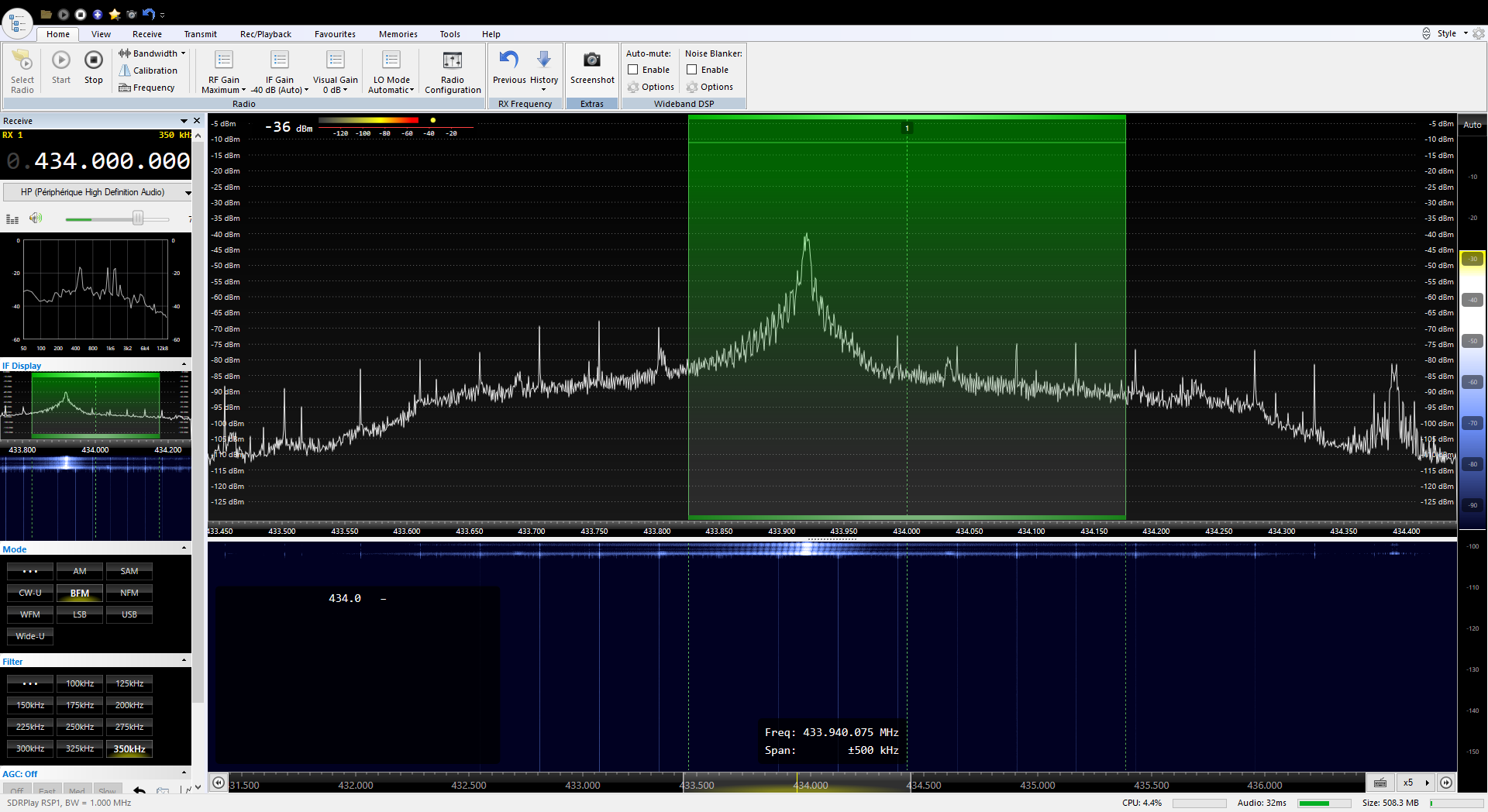
A typical application, is to replay a signal. Picture above shows a replay of a signal from a RF remote switch. So first, record few seconds of signal, CTRL^C for stop recording. Then replay it with play.
Transponder
 We can also live transmitting a received band frequency. Here the input frequency is a FM broadcast station which is retransmit on 434MHZ.
Relay with transmodulation
We assume that input frequency is tuned on FM station. It is demodulated and modulate to SSB on 434MHZ. SSB is not HiFi, so prefere to choose a talk radio, music sounds like bit weird !
Range
It has been mostly untested, but i've tested it on 95 mhz, with a 79 cm antenna, the signal depending on the directionality, transmitter elavation, it can reach about 300 meters
Transmitter Power
By default the Raspberry Pi outputs 4 mA on a gpio pin, but here it gets overriden to max, which is about 16 mA, some apps have a setting to change the power, here is a sheet of the power levels and their correspondent radiated power: (NOTE: RADIATED POWER, NOT ERP, TO HAVE THE EXACT TX POWER OF A TRANSMITTER, THE ANTENNA EFFIECENCY AND GAIN WOULD NEED TO BE COUNTED IN THE CALCULATION)
0 = 6.6 mW
1 = 13.2 mW
2 = 19.8 mW
3 = 26.4 mW
4 = 33.0 mW
5 = 39.6 mW
6 = 46.2 mW
7 = 52.8 mW
To continue
rpitx2 is a generic RF transmitter. There is a lot of modulation to do with it and also documentation to make all that easy to contribute. This will be the next step ! Feel free to inspect scripts, change parameters (frequencies, audio input, pictures...).
Credits
All rights of the original authors reserved. I try to include all licences and authors in sourcecode. Need to write all references in this section.