 3bbc80a14f
|
||
|---|---|---|
| images | ||
| Anton 2020-07-29.rar | ||
| LICENSE | ||
| ModuleEchoLink.conf | ||
| README.md | ||
| SDRplay_RSP_API-ARM32-3.07.2(2).run | ||
| giga_echo_link.py | ||
| giga_echo_link_tx.grc | ||
| giga_echolink_rx.grc | ||
| giga_echolink_rx.py | ||
| ptt.pl | ||
| read_pts.sh | ||
| rpi_interface.grc | ||
| rpitx_interface.py | ||
| rpitx_test.grc | ||
| rptx_traqnsmitter.py | ||
| start_echo_test.sh | ||
| start_gnuradio_ptt.py | ||
| start_tx.sh | ||
| stop_gnuradio_ptt.py | ||
| stop_tx.sh | ||
| svxlink.cfg | ||
| svxlink.conf | ||
README.md
svxlink_to_rpitx
This repository will have the code to use rtl_sdr dongle vir reception and rpitx as transmitter. I got insperation from the code devloped here http://www.pg540.org/wiki/index.php/RPITX_interface_to_SVXlink_using_GNUradio
Description
This project will run on a raspberry Pi and use rpitx Transmitter board from Giga Technology for TX and rtl_sdr dongle for reseption.
Gnuradio will be used to interface between svxlink and rpitx and from rtl_sdr and svxlink
Functional Description : The receiver side is all handled by allready existing functionality in SVXLink using Ddr receiver.
All configuration is well documented in svxlink.conf. The transmitter part interface is made out of 3 components.
The audio coming from SVXlink TX1 is routed via UDP port 1235 to GNUradio, the PTT is routed to PseudoTTY port /home/pi/ptt and the TCP output port 8011 of GNUradio IQ stream is routed to RPITX.
When SVXlink wants to transmit it sends a charackter T to the PseudoTTY device ( PTT ON ), a perl script which is started after the start of SVXlink will monitor this PseudoTTY and once it will see the character T it will execute other script starting first RPITX snd then Python GNUradio script.
This will switch on the transmitter and audio is routed to RPITX. When SVXlink need to stop transmitting then the character R is send by SVXlink to the PseudoTTY and received by the script monitoring the PTY. It will kill RPITX and Python GNUradio script.
As it takes a bit of time to start RPITX ( initializing the PLL ) and starting the TCP listener and starting Python some extra delay is given to SVXLink in the configuration.
The script stop_gnuradio_ptt.py and start_gnuradio_ptt.py id sending a xmlrpc message to gnuradio to stop or start the tx rf signal that get send to rpitx
Dependinsies
- rpitx
- rtl_sdr
- svxlink
- gnuradio
Usage
copy all repository files in the root pi directory.
copy the svxlink.conf to the /etc/svxlink/ directory
run the following scripts in the pi directory.
sudo ./start_tx.sh
sudo ./start_tx.sh
Set the rx frequency in the svxlink.conf file.
Set the tx frequency in the start_echo_test.sh script
Set the Vox level in the svxlink.conf
set the echolink audio level in the svxlink.conf
Gnuradio Block diagram

Hardware
- Raspberry Pi hat from Giga Technology http://www.giga.co.za
- Raspberry Pi
- rtl SDR dongle
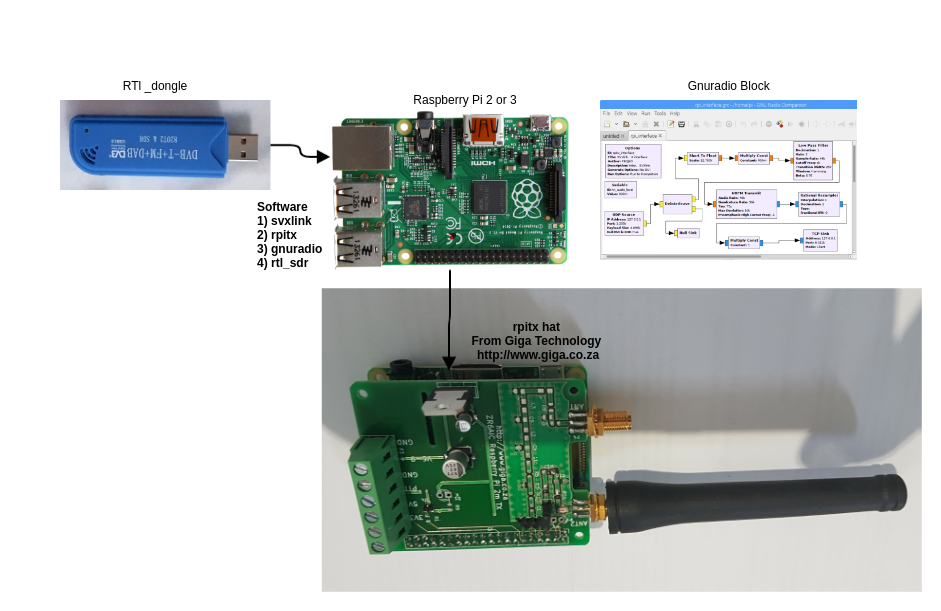
Project Status
Working SVX link system.
rtl recever
sudo rtl_fm -f 94700000 -s 44100 -g 50 -l 0 - | sudo aplay -D hw:1,0 -t raw -f S16_LE -r 44100 -c 1
SVX Configuration
SVXlink configuration changes are :
The svxlink.conf in this repository has already have this config
In [RX1] of svxlink.conf configure TYPE=Ddr, SIGLEV_DET=DDR, SIGLEV_DET=2.61, SIGLEV_OFFSET=150, FQ=433540000, WBRX=WbRX1
In [WbRX1] put TYPE=RtlUSB, DEV_MATCH=0, HOST=localhost, PORT=1234, CENTER_FQ=433540000, GAIN=3.7,PEAK_METER=1, SAMPLE_RATE=960000
In [TX1] put TYPE=LOCAL, AUDIO_DEV=udp:127.0.0.1:1235, AUDO_CHANNEL=0, PTT_TYPE=PTY, PTT_PTY=/home/pi/ptt.pl